Mercedes-Benz EQXX
AI-Assisted Design Visualization
Workflow development and evaluation for automotive visualization, controlled design modifications and iterative development.
Project Overview
An investigation into generative AI using Mercedes-Benz EQXX design material, covering rapid visualization, regional editing, design transfer and segment exploration.
Project Objectives and Scope
Develop and evaluate image-based workflows that support early automotive design review. The scope includes sketch visualization, targeted front-end changes, reference-based transfer, segment reinterpretation and presentation from 3D modelling views.
My contribution: digital modelling, local AI workflow development, visual iteration and output selection. This independent study uses public concept references; it is not a commissioned Mercedes-Benz programme.
AI-Assisted Visualization Workflow
Prepare references → define constraints → generate candidates → compare with inputs → select and refine.
Source Materials and Input Preparation
Sketch inputs: EQXX sketches and proposal sheets establish proportion, stance and surface direction. 3D inputs: Alias views establish the model baseline. Additional references: front-end and product images define the requested change or visual treatment.
Assign each input a specific role. For regional editing, define the target mask before generation. Separate the intended changes from features to review for consistency.
Tools, Models and Pipeline Configuration
| Tool | Documented role |
|---|---|
| Blender | Initial volume development, described in the report. |
| Autodesk Alias | NURBS surface development, shown in the modelling views. |
| Flux / ComfyUI | Local structure-conditioned generation, masked inpainting, reference transfer and presentation studies. |
The report describes structure conditioning, seed-based exploration, masking and adjustments to conditioning influence. Exact model builds, graph files, seeds and numerical settings were not supplied; these notes describe the methodology rather than an executable reproduction package.
Geometry Preservation and Design Consistency
Compare silhouette, wheelbase, wheel placement, roofline, glazing, panel boundaries and front/rear graphics against the relevant source. For localized edits, inspect the mask boundary, lighting blend and features outside the target region.
Prompt constraints express intended consistency. They do not establish unchanged geometry or identical pixels. The examples show visual comparison; no quantitative geometry-preservation test is reported.
Output Evaluation and Refinement
Evaluate each candidate against the requested change and the source features intended to remain consistent. Review proportion, detail integration, lighting, reflections and image artefacts before selection.
The supplied report presents selected outputs and describes iteration. Rejected candidates, complete run logs and measured acceptance thresholds are not included, so repeatability and performance cannot be quantified from this evidence.
Applications of AI in Automotive Design
3D Modelling and AI-Assisted Presentation
Alias NURBS views and environment-based presentation outputs.
Process and review criteria
Move from modelling views to readable review images.
Resolve volumes → develop NURBS surfaces → explore presentation contexts.
Three Alias views and four environment treatments.
The report describes a Blender volume block-out followed by Alias NURBS development and Flux/ComfyUI presentation imagery. The supplied visual evidence shows Alias views and final image outputs; a separate Blender-stage image is not present.
Review focus: silhouette, panel boundaries, glazing, wheels and whether environmental generation has reinterpreted the model. The outputs are presentation studies, not proof that the renderer leaves model geometry unchanged.
Evidence: report §6.5, PDF pp. 28–31. These images show NURBS development; surface-quality assessment would require dedicated continuity and highlight checks.
- Blender for initial volume development, as documented in the report.
- Alias for NURBS surface development shown here.
- Flux / ComfyUI for environment-led presentation passes.
Presentation Prompt Structure and Environment Settings
Fixed intent: retain vehicle details, placement and framing; cool silver paint; remove visible Alias surface lines; use natural reflections and restrained photographic grading.
Variable block: environment, lighting, ground texture, reflection contrast and photographic lens intent.
- Parking structure / skylight shafts / 35 mm intent.
- Studio / softbox lighting / 85 mm intent.
- Desert / overcast haze and mirror panel / 100 mm intent.
- Industrial / raking golden-hour light / 50 mm intent.
Summarised from PDF p. 31. These are documented photographic targets, not measured camera calibration; strict alignment across settings is not claimed.
Image Generation and Design Development
Sketch-conditioned visualization and candidate exploration.
Process and review criteria
Make early design intent easier to assess and discuss.
Assign reference roles → condition structure → generate candidates → select.
Source sketches, proposal sheet and viewpoint/finish variations.
The report describes a local Flux/ComfyUI graph: an edge/structure map conditions the generation, followed by seed-based candidate exploration and designer selection.
Reference roles: sketch = proportion and stance; AI output = visualisation proposal. Alternate viewpoints remain interpretations, not validated reconstructions.
Evidence: report §6.1, PDF pp. 21–23. Exact graph, seeds, denoise values and run prompts were not supplied.
- Anchor structure with sketch-derived conditioning.
- Explore finish and light across candidate outputs.
- Select by design intent, not image polish alone.
Controlled Design Iterations
Masked front-end editing using a separate design reference.
Front-End Design Reference
Applied to the front region of the base vehicle.
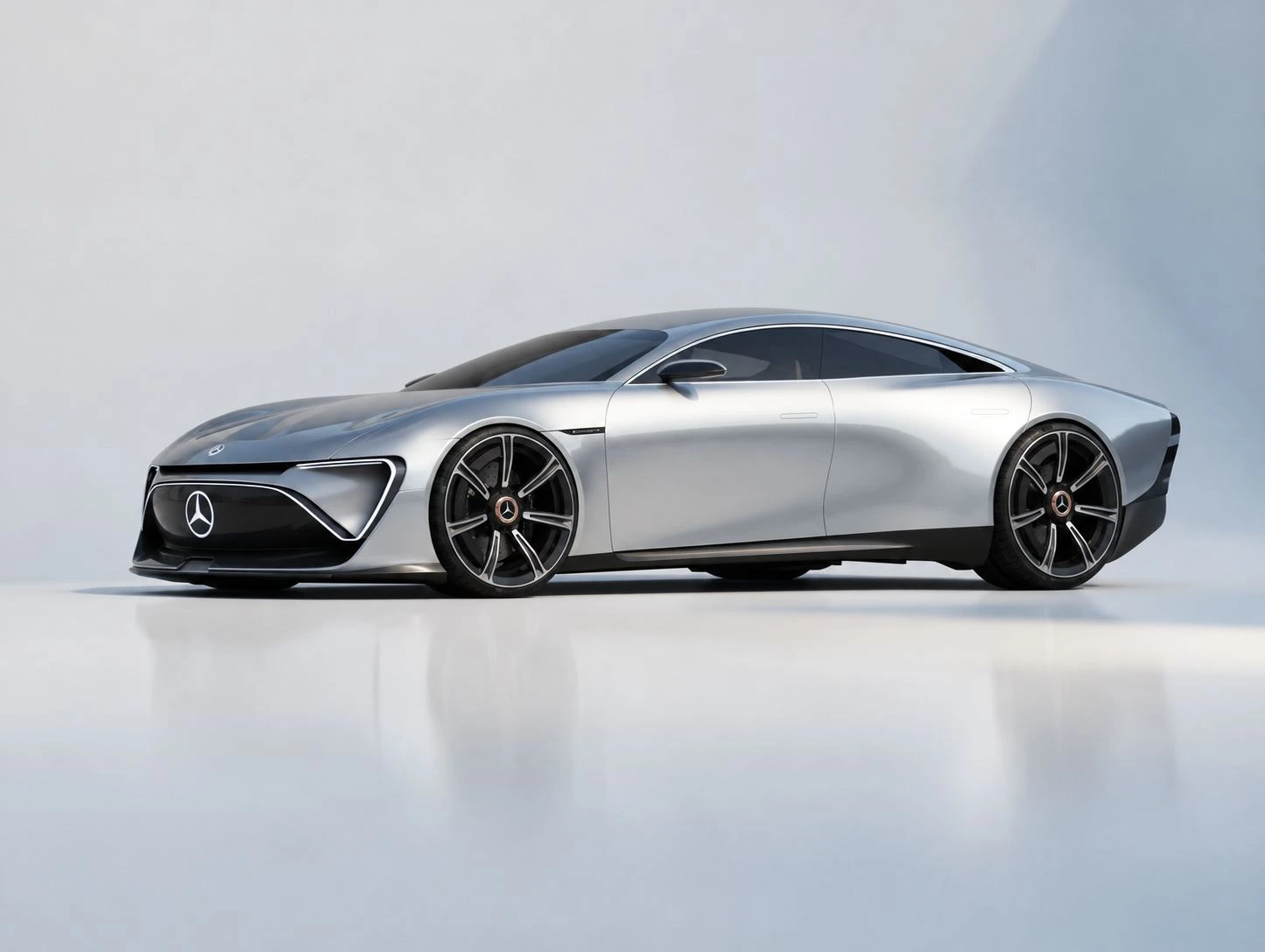
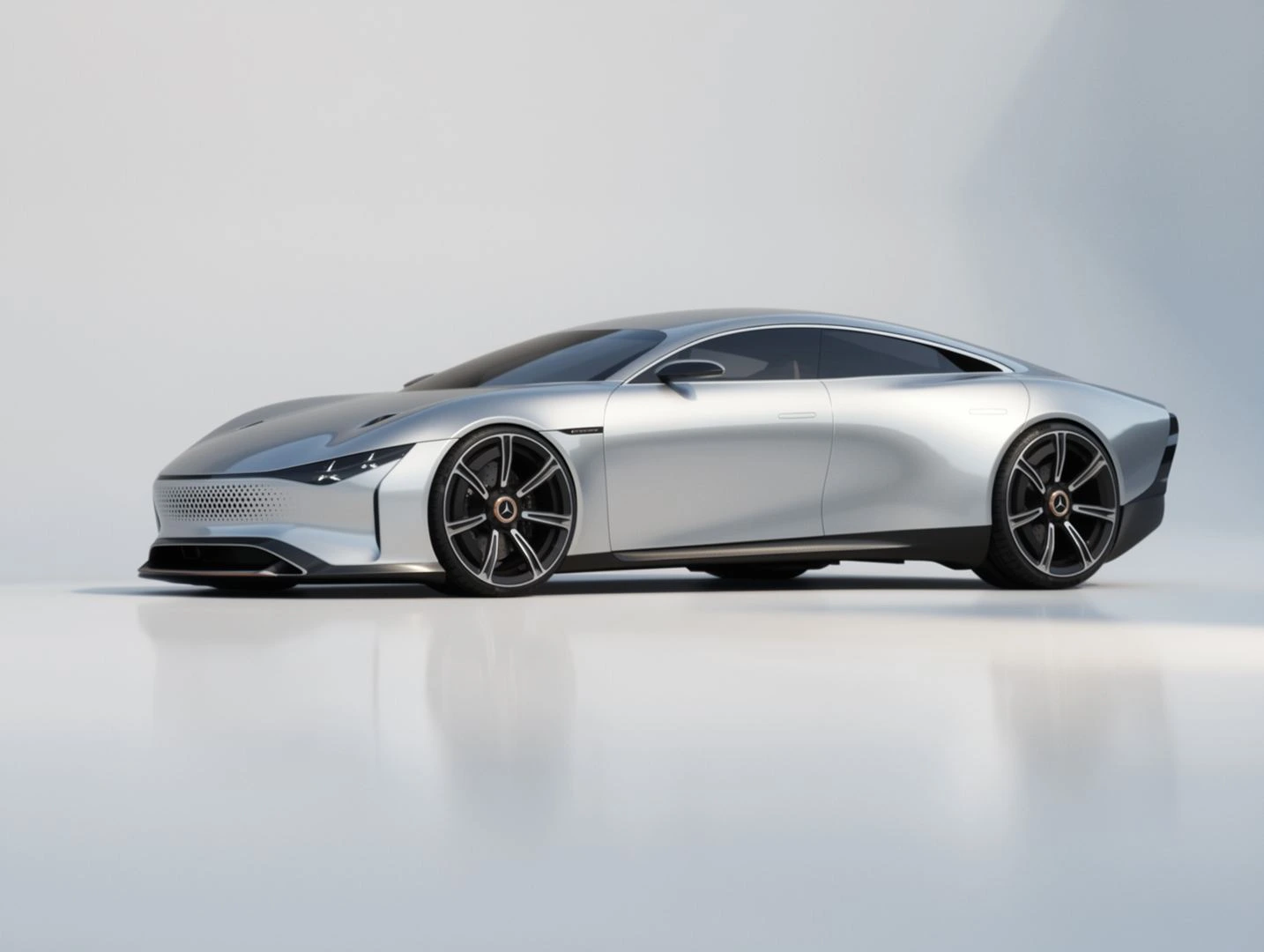
Process and review criteria
Evaluate a front-end direction without restarting the whole concept.
Define target region → apply reference → blend → review retained features.
Base image, front-end reference and input/result comparison.
The report documents manual masking and Flux inpainting in ComfyUI, with compositing intended to retain the unmasked base.
Review focus: mask boundary, lighting blend, panel connections, wheel placement and preserved silhouette.
Evidence: report §6.2, PDF pp. 23–24. The mask and original graph are not included here; the displayed comparison does not establish unchanged pixels outside the edit.
- Define the edit region around the front end.
- Condition that region with the design reference.
- Review retained features — wheelbase, glazing and body character.
Reference-Based Design Transfer
Vehicle structure and product styling used as separate reference inputs.
Process and review criteria
Compare alternative visual directions around an established proposal.
Vehicle input for structure + product input for style → generate → assess.
Two reference inputs and an interpreted result, including visible design changes.
The documented method combines vehicle and style/material inputs in a low-denoise Flux/ComfyUI pass. Structure and surface language are assigned different roles.
The result shows a stronger graphic front and altered wheel treatment. These are visible design changes, so this is presented as reference-led reinterpretation rather than exact geometry preservation.
Evidence: report §6.3, PDF pp. 25–26. The product-style reference is described as AI-generated, with no real manufacturer basis.
- Vehicle input anchors the design direction.
- Product reference supplies a different visual language.
- Assess the transfer alongside changes to form and details.
Vehicle Segment Exploration
A compact hatchback interpretation developed from a low vehicle format.
Process and review criteria
Open a discussion about how a direction could extend into another segment.
Name retained cues → change proportion brief → generate → compare.
Low vehicle format and compact hatchback interpretation.
The report describes reduced image-conditioning influence and a stronger written target-segment brief. The requested change is structural; close duplication of the original silhouette would miss the intent.
Review focus: cabin usability in visual terms, wheel-to-body relationship, roof transition and continuity of selected design cues. This is an image-based concept exploration, not packaging or engineering validation.
Evidence: report §6.4, PDF pp. 26–27.
- Change proportions deliberately — roof, cabin and rear volume.
- Retain selected cues — front character and surface language.
- Judge against the new brief, not silhouette similarity.
Results and Workflow Capabilities
The examples demonstrate five applications, with source inputs and selected outputs available for visual comparison.
| Application | Outcome shown | Evaluation limit |
|---|---|---|
| 3D presentation | Modelling views and four environment treatments. | Generated images may reinterpret model details. |
| Sketch visualization | Vehicle visualizations and viewpoint variations. | Views are interpretations, not a validated reconstruction. |
| Regional editing | A front-end modification with an input/output comparison. | Framing differs; unchanged pixels are not established. |
| Reference transfer | A new surface and graphic treatment. | Front graphics and wheels also change. |
| Segment exploration | A compact hatchback interpretation. | Packaging and engineering feasibility are not validated. |
Key Findings and Future Development
Findings: separating reference roles and defining the intended change provides a clear basis for output review. The selected examples demonstrate workflow breadth, while visible detail changes show why source comparison remains necessary.
Future development: retain complete graphs, model versions, prompts, masks, seeds and settings; document rejected outputs and selection criteria; introduce consistent comparison views and timed trials. These additions would support reproducibility and measurable assessment of design consistency and efficiency.
Project Information
Authorship & context
Independent design and AI workflow study by Vijay Parth Yadav. Shown as a personal educational exploration, not an official Mercedes-Benz programme or commissioned campaign.
EQXX concept sketches and source references: © Mercedes-Benz AG, as credited in the supplied report. AI outputs and digital modelling work are attributed to the author in that report.
Evidence & tools
Extracted from the supplied PRP report, application chapter §§6.1–6.5, PDF pages 21–31. The report identifies the imagery as based on public concept material and states that no confidential studio work is shown.
Tools documented: Flux, ComfyUI, Blender and Autodesk Alias. Process notes summarise the report; unavailable settings and workflows have not been reconstructed as exact records.
Image quality & review notes
Images retain their embedded PDF resolution, approximately 1,024–1,600 pixels wide. No AI upscaling or new image generation was used to build this folio.
Some supplied outputs visibly reinterpret details. Comparisons are for visual review; they do not establish identical pixels, exact 3D reconstruction or engineering suitability.